Connect Newsletter
Feb. 19, 2026 |
 Final Reminders Before First Payroll Run in UKG Final Reminders Before First Payroll Run in UKG
- Staff:
- Make sure your timecards are correct! You can correct missed punches, but it is critical this is done in time for your manager to approve the pending change.
- You can now approve your own timecard (optional not mandatory), which tells your manager the punches are correct from your perspective. Please note, if you approve your timecard, your manager can no longer correct errors unless you remove approval.
- Managers/Leaders:
- Reminder that Payroll deadlines for Monday are different starting Feb. 23. Please visit Connect Newsroom to revisit the news.
- Approve your staff’s pending changes and timecards sooner than later to ensure paychecks will be correct.
- Please check out the Dataview Library if you have not yet, there are many helpful ways to look at data, such as:
- 0-ST Accrual Details-Basic showing current PTO balances of your staff.
- 0-ST Time Off Requests Info showing all PTO requests (NOTE a Hyperfind can be used to see non-direct reports’ PTO in your department).
- For other tips on approving PTO, review this tip sheet UKG-Manage Employee Time Off Requests.aspx.
- Reminder that in UKG, managers must manually add all attendance occurrences. Missed punches no longer automatically apply occurrences. These tip sheets provide more details: UKG-Review Attendance Balances.aspx UKG-Manage Attendance Balances.aspx.
- The manage timecards tile on the UKG homepage will now show ONLY your direct reports. When you open the activity, by clicking the arrow, you can still use Hyperfind to see timecards for different staff in your department.
- Remember to join a drop-in session on Friday or Monday if you have any questions! Zoom links are on the right side of the UKG CookNet Resources page.
|
| |
 1095-C Forms are Available in Workday 1095-C Forms are Available in Workday
Every benefits-eligible employee under the Cook Children's benefit plan is required to receive a 1095-C form, even if you didn't participate in the plan. You don't need it to file your taxes but keep it for your records. Employees who have elected to receive a paper copy will have their 1095-C mailed to their home address. Electronic copies are available to all employees and can be accessed in Workday by typing “My ACA Forms” in the search bar. |
| |
 Changes to Ntracts Coming Soon Changes to Ntracts Coming Soon
Since 2019, Cook Children’s has used Ntracts as its contract management system. It currently holds approximately 12,000 contracts for business conducted across all Cook Children's entities. For the first time in six years, Ntracts is being upgraded. Starting on March 16, Ntracts users will see a new URL to log in and a new Dashboard to show you a snapshot of which contracts or renewals are in your queue to review. If you use the workflow functionality, it will also be upgraded to a more modern look that adds visibility to each step. Security will be upgraded as well. Please be on the lookout for classes to be scheduled for the week of March 9-13. Please contact Kerri Albert with any questions in the meantime. |
| |
 Receive Your LinkedIn Verification Receive Your LinkedIn Verification
Trust is the most important thing we build at Cook Children’s, and today, that trust has a new seal. We are proud to announce that our LinkedIn page is now officially verified. While it looks like a simple badge, it represents something much larger: our commitment to providing a safe, reliable space for communicating effectively and authentically with our families and partners. This milestone also brings an exciting update for our team. Every Cook Children’s employee can now add a workplace verification badge to their own personal profile using their work email. It is always a joy to see our employees representing our mission with such professionalism. If you’ve already added your badge, or if you’re planning to today, it’s a great way to show the strength of our community. A step-by-step guide to workplace verification via LinkedIn. (Takes fewer than two minutes to complete.) - Navigate to your LinkedIn profile via desktop or mobile app.
- Select “add verification badge” located next to your name. OR select the resources button (three ellipses on mobile, then resources), then select “about this profile.” Under the “Verifications” section, select verify.
- Select “verify using your workplace.”
- Enter your Cook Children’s email address.
- Enter the code that is emailed to you. (This may take up to several minutes to arrive).
|
| |
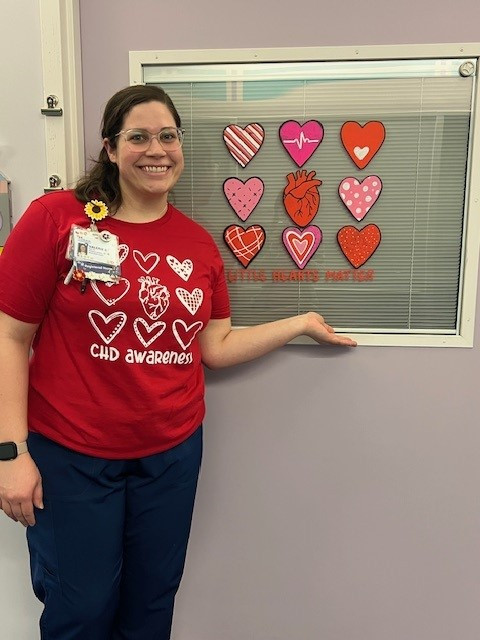 Employee Spotlight: Valerie Bilton Creates Joy during Heart Month Employee Spotlight: Valerie Bilton Creates Joy during Heart Month
February is Heart Month and we have several ways we celebrate with our patients, families and staff. For Valerie Bilton, RN, a night shift nurse in the Cardiac Stepdown unit, she brings joy through her art. For Heart Month, she decorated the doors of our patients with her amazing artwork. She also decorates the doors throughout the holiday season, and her creative passion creates a warm welcoming environment. Take a peek at her creative artwork on Connect Newsroom and thank you Valerie for bringing your creative skills to our patients' door! 🎨💖 |
| |
 Support Creative Arts Program with Purchase of “Tree of Love” T-shirt Support Creative Arts Program with Purchase of “Tree of Love” T-shirt
A new t-shirt featuring patient artwork is available at the Enchanted Gift Shop. Titled “Tree of Love,” the shirt costs $20. Proceeds from sales will go towards supporting the Creative Arts Program here at Cook Children's. Please note that there is a limited stock and not all sizing will be available. |
| |
Share Your Content with UsDo you have any tips, ideas or content you would like us to know about? We want to hear from you! Please view our SharePoint site and email us at InternalCommunications@cookchildrens.org. Check our CookNet calendar for more system-wide events and to find more content about our employees and news you need to know, bookmark our Connect Newsroom website. |
| |