26
September
2024
|
15:02 PM
America/Chicago

Performance & Development Digest (Sept. 26, 2024)

Summary

This newsletter and all articles are for internal communication purposes only and are not to be shared outside of the system.

masthead_perf_dev

Performance and Development Digest                                  
Sept. 26, 2024
 

FYI 612x612Check-in Conversations Address Professional Growth and Goals

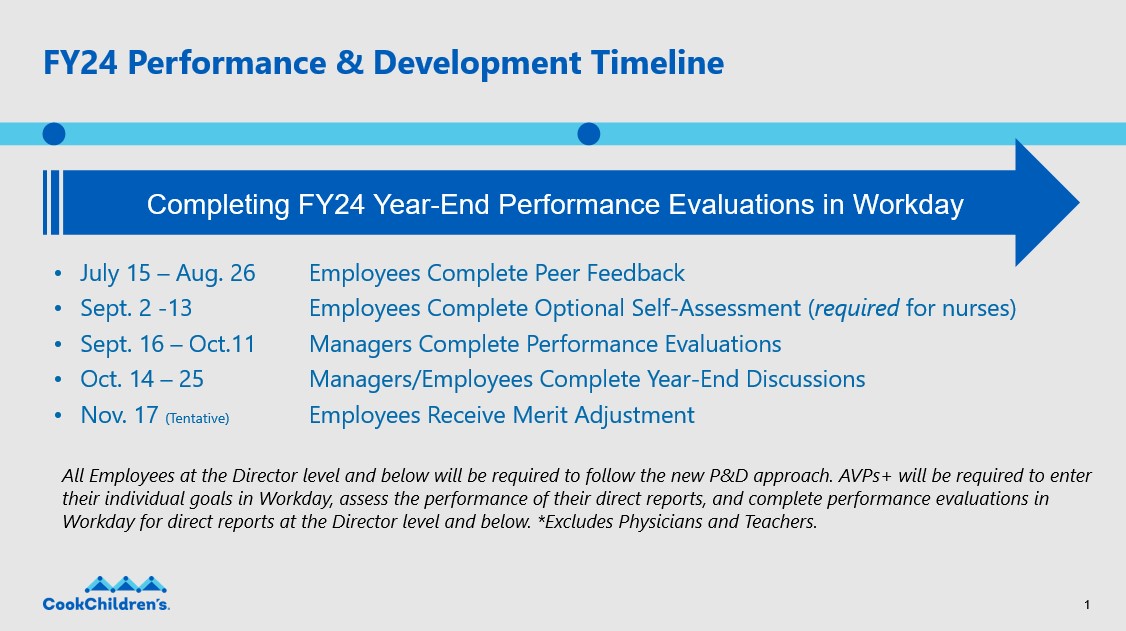
Year-end performance reviews are underway in Workday for the first time, marking a milestone in our Performance & Development (P&D) changeover at Cook Children’s.  

What comes next? A check-in conversation.

These one-on-one sessions provide you and your manager with a scheduled block of time to discuss your workplace achievements, skills and targets for growth. Check-ins pave the way for continued improvement in the future rather than simply evaluating how you performed in the past.

“It’s an opportunity to talk about career goals, progress, strengths, challenges and areas where you might need support,” said Merridth Simpson, AVP Human Resources Operations. “We encourage employees to approach these discussions as a resource to gain insights and direction. Check-ins are a win-win for professional development.”

Year-end performance evaluations for Fiscal Year 2024 will wrap up Oct. 11 (read more on this topic in the previous P&D Digest: “Get Ready for Year-End Performance Reviews.”) The next phase, check-in conversations, runs from Oct. 14-25.

Check-in conversations are required at year-end and mid-year (March) under our new P&D model, which replaces PACE. Additional check-ins throughout the year are recommended as a venue for constructive feedback that helps you improve in your role.

A few tips for a productive conversation:

  • Prepare: Take time beforehand to reflect. What achievements from the past year are you most proud of? What Cook Children’s core values did you demonstrate? How did you navigate any challenging aspects of work this year? Do you need support?
  • Engage: Listen actively to your manager’s feedback and suggestions. Ask questions to clarify anything that’s unclear. 
  • Open up:  Share your honest perspective. Your input can connect the dots to help your manager make specific and impactful recommendations.
  • Follow through: Take the feedback you receive and put it into practice. Be receptive to any constructive feedback you receive as well -- it’s how we grow. Proactively approach your manager for guidance as needed.

It’s not necessary to document these conversations, as both the employee and the manager will “acknowledge” that the check-in discussion occurred via Workday. However, feel free to make a note if there are key things discussed that you feel are important for you to remember. That way, you have something to refer back to at the next check-in.

These conversations are a component to our new P&D model, which aims to create an environment where every employee feels valued and engaged to perform their best. You’ll find a variety of features – including Talent Profile, Career Growth Plan and Peer Feedback – in Workday. Using these bonus tools in Workday can elevate your professional growth as we strive to keep Cook Children’s at the forefront of excellence in pediatric health care.

Refer to the Check-in Conversation Job Aid links to learn more.

NOTE: Performance & Development information is item No. 4 under Workday Resources Hub in CookNet.


Anytime feedbackWay to Go! Give Co-Workers a Shoutout with Anytime Feedback

A new feature in Workday gives you a platform to applaud your colleagues for their exceptional performance, based on your interactions with them on the job. 

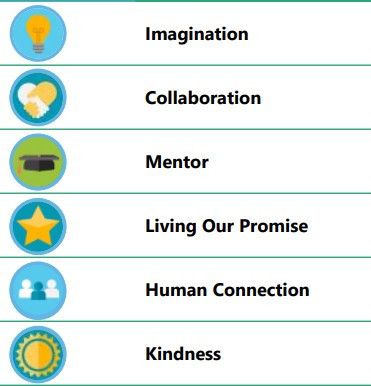
With Anytime Feedback, available starting Sept. 30, you can provide specific and personalized input to commend your co-workers. Anytime Feedback offers a choice of feedback badges to indicate a particular area where a colleague has excelled. 
 

“Giving one another positive recognition helps us sustain a culture of kindness and respect in the workplace,” said Merridth, Simpson, AVP Human Resources Operations. “We encourage everyone to use Anytime Feedback to point out each other’s strengths and outstanding qualities. By sharing positive reinforcement, we help one another thrive and flourish.” 

You can use Anytime Feedback year-round to express appreciation for your colleagues’ contributions. For example, when someone on your team goes above and beyond to show: 

• Generosity that makes a difference to a patient or family 
• Imagination or collaboration to solve a problem 
• A commitment to safety that inspires others 
 

You have the option to make the Anytime Feedback you provide confidential, viewable only by the recipient’s manager and Human Resources. The manager is responsible for sharing the feedback with the recipient. 

If you select “Share with others,” all Cook Children’s employees will be able to view the feedback on the recipient’s Talent Profile in Workday. 

There’s an important difference between Anytime Feedback and a similar Workday feature called Peer Feedback. Anytime Feedback is designed for kudos to colleagues, while Peer Feedback includes input on their strengths as well as areas for development. 

This feedback doesn’t factor into anyone’s performance evaluations. Instead, it supports their professional growth and development. 

Refer to the Anytime Feedback form Clickview or Job Aid to learn more.  


Tips Tips for Managers: Viewing the Completed Review
Once a performance evaluation is completed, managers may be wondering how to view it – including the manager evaluation portion – in Workday. Follow these steps:

  1. Go to the employee’s profile > Performance (left side of screen, blue bar) > Review and click “view” next to the “FY 2024 Year-End Performance Review.”
  2. To print, after you have clicked view, look on the left side of the screen under where it says “View Printable Employee Review” and click the printer icon. It will generate a combined PDF that you can print. Once it’s available to print, you’ll see it show up in the bell icon at the top right of the screen next to your image.
 

Resources for You

ICYMI: Please take the time to watch our most recent Town Hall that includes an update from Merridth Simpson, AVP, Human Resources Operations. Merridth present at about the 18-minute mark of the video. Click here to watch the video. 

Tips for Providing Peer Feedback 

Performance & Development Digest: Sept. 11, 2024

Performance & Development Digest: Aug. 29, 2024

Performance & Development Digest: Aug. 15, 2024

Performance & Development Digest: Aug. 1, 2024

Performance & Development Digest: July 18, 2024

Performance & Development: Resources for You (cookchildrensconnect.com)

On-demand, role-based training is available, complete with job aids and clickviews (step-by-step instructions). Click here to access these resources. NOTE: Performance & Development information is item No. 4 under Workday Resources Hub.

New Timeline